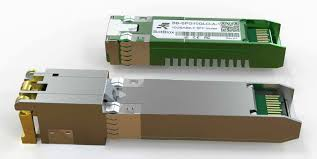
Don’t Waste Your Copper: Upgrading to 10G with 10GBASE‑T SFP+ Modules
Many enterprises and institutions invested heavily in structured cabling years ago, installing Cat6a or Cat7 copper throughout their buildings. When the time comes to upgrade the network from 1 Gigabit to 10 Gigabits per second, the natural assumption is that fiber optics must replace all that copper. That assumption is expensive and often unnecessary. By using 10G SFP+ modules with a 10GBASE T copper interface, network managers can keep their existing twisted‑pair cabling and simply plug a small transceiver into the SFP+ ports of their core switches.
The switch port effectively becomes a 10G copper port, connecting directly to the legacy cable plant. This article explains how to plan and execute such an upgrade, what cable requirements must be met, and how to avoid common pitfalls – saving thousands of dollars in re‑cabling costs and weeks of construction time.
How a 10GBASE‑T SFP+ Module Enables Copper Preservation
The Technology Inside the Module
A 10GBASE‑T SFP+ module is far more than a simple plug adapter. It contains a sophisticated PHY (physical layer) chipset that performs echo cancellation, adaptive equalization, and PAM‑16 (16‑level pulse amplitude modulation) with DSQ128 encoding. To overcome the signal degradation inherent in copper cables at 10G speeds, the module also implements LDPC (low‑density parity‑check) forward error correction. The module’s DSP (digital signal processor) continuously adapts to the characteristics of the attached cable, compensating for crosstalk, attenuation, and impedance mismatches. The result is a reliable 10G link up to 30 meters over Cat6a or Cat7 cabling. From the switch’s perspective, the SFP+ slot sees a standard 10G optical module – the copper PHY handles all the line‑side complexity.
Why Re‑cabling Is Often Unnecessary
In a typical enterprise, copper cables run from wiring closets to office outlets, from server racks to patch panels, or between IDF (intermediate distribution frame) and MDF (main distribution frame) rooms. If those cables were originally installed as Cat6a or Cat7, they were designed to support 10GBASE‑T up to 100 meters in a perfect environment. However, when using a 10GBASE‑T SFP+ module inside a switch, the effective reach is limited to 30 meters – not because the cable is incapable, but because the SFP+ module has strict power and thermal constraints. For the vast majority of intra‑building links (from a wiring closet to a nearby office, or from a top‑of‑rack switch to a server within the same row), 30 meters is more than sufficient. Therefore, re‑cabling with fiber would be a waste of perfectly good copper.
Critical Requirements for a Successful Upgrade
Cable Certification: Cat6a or Cat7 with 500MHz Bandwidth
Not all copper cables are equal. For a 10GBASE‑T SFP+ module to achieve a stable 30-meter link, the cable must be certified for at least 500MHz bandwidth. Cat6a (augmented Category 6) is the minimum; it guarantees 500MHz performance up to 100 meters. Cat7 (Class F) offers 600MHz and better shielding, which helps in electrically noisy environments such as factory floors or near heavy machinery. Cat5e or ordinary Cat6 (without the “a”) will not reliably support 10G at any distance when used with SFP+ modules – they may link at 1G or fail entirely. Before starting the upgrade, audit your existing cabling. Look for markings on the cable jacket: “Cat6a”, “Cat7”, or “Cat6a/STP” (shielded twisted pair). If the cable is unmarked or labeled only “Cat5e”, you cannot reuse it for 10G.
Link Distance and Environmental Factors
The 30-meter specification assumes a clean, properly terminated Cat6a channel with no more than two connectors (patch panel + wall outlet). In real‑world deployments, factors like poor punch‑down terminations, untwisted pairs near connectors, or adjacent crosstalk from bundled cables can reduce the usable distance to 15‑20 meters. For links approaching the 30-meter limit, use a cable certifier (e.g., Fluke DSX) to measure the insertion loss and near‑end crosstalk (NEXT). If the margin is insufficient, consider relocating the switch closer to the endpoints, or use a low‑power 10GBASE‑T SFP+ module (some consume only 2.3W, generating less heat and maintaining signal integrity better over longer distances).
Deployment Scenarios and Topology Example
Typical Topology: Core Switch with SFP+ Ports to Copper Endpoints
Imagine a school campus that pre-wires each classroom with two Cat6a drops running back to a wiring closet. The existing core switch is a 48‑port Gigabit switch with four SFP+ uplink ports. The school wants to upgrade the media lab (10 workstations) to 10G for video editing. Instead of pulling new fiber to each workstation, the IT team does the following:
Install a 10GBASE‑T SFP+ module into one of the core switch’s SFP+ uplink ports.
Connect that port via a short Cat6a patch cord to the existing patch panel that serves the media lab.
In the media lab, each workstation receives a 10G PCIe network card with an RJ‑45 port (or a card that accepts another SFP+ module). Connect each workstation to the wall outlet using Cat6a patch cords.
The existing 30-meter cable run from the wiring closet to the media lab now carries 10G traffic.
The core switch sees the SFP+ port as a 10G optical link, but the physical medium is copper. No fibre, no new conduits, no construction dust.
Upgrade Path for Server Racks
In a small data center, servers may be connected to a top‑of‑rack (ToR) switch using 1G copper. If the ToR switch has SFP+ ports (often 4‑8 ports) but limited 10G RJ‑45 ports, you can insert 10GBASE‑T SFP+ modules into those SFP+ cages and connect directly to the server’s onboard 10GBASE‑T NIC (many modern servers include 10G copper ports). This is especially valuable when servers are spread across two or three adjacent racks, with pre‑existing Cat6a cabling running through overhead trays. The upgrade takes hours, not weeks.
Step‑by‑Step Upgrade Process
Phase 1 – Audit and Certification
Map every copper link you intend to upgrade. Measure its length. Certify it for Cat6a performance (500MHz, NEXT, return loss). Replace any patch panels or wall jacks that show high loss. Document which switch ports will receive 10G SFP+ modules.
Phase 2 – Procure Compatible Modules
Purchase 10GBASE‑T SFP+ modules that are coded for your switch brand (Cisco, Arista, HPE, etc.). Ensure they are “low‑power” variants (≤2.5W) if your switch has limited cooling or dense port populations. Order one or two extra modules for testing.
Phase 3 – Install and Test
Insert the modules into the designated SFP+ slots. Connect the existing copper patch cords. On the switch, verify that the port auto‑negotiates to 10G full duplex. Use the switch’s diagnostics (show interface transceiver or similar) to read the module’s temperature and voltage. Run an iperf3 test between a 10G‑capable endpoint and a server to confirm line‑rate throughput. Monitor for CRC errors – if errors appear, the cable may be marginal; try a shorter path or re‑terminate the ends.
Real‑World Case Study: City School District Upgrade
A school district with five buildings had installed Cat6a cabling during a renovation in 2018. The core switches were Cisco 3850s with SFP+ uplinks. To support a new STEM lab with 10G NAS and 10 workstations, the district was quoted $25,000 for fiber installation. Instead, the IT director purchased 12 10GBASE‑T SFP+ modules (coded for Cisco) for $180 each. They replaced the workstation NICs with 10G copper PCIe cards ($80 each). Total cost: under $6,000. The upgrade was completed over a weekend. Two years later, all links are stable, and the district has deferred fiber upgrades indefinitely.
Conclusion
The 10GBASE‑T SFP+ module is a powerful enabler for cost‑conscious network upgrades. It allows organizations to reuse their existing Cat6a or Cat7 copper cabling, turning SFP+ ports into 10G copper interfaces without re‑cabling. For enterprise IT managers, weak‑current project leads, and system integrators, mastering this approach means faster project completion, lower capital expenditure, and less disruption to daily operations. Just remember: certify your cables first, choose low‑power modules, and always test before committing to a full deployment. Your copper plant is not obsolete – it is an asset waiting to run at 10G.
Disclaimer
This article is provided for informational and educational purposes only. The technical details regarding 10GBASE-T SFP+ modules are based on general industry standards and typical deployment practices. Actual performance may vary depending on hardware compatibility, cable quality, environmental conditions, and vendor-specific implementations. Readers should consult official documentation and qualified network professionals before making deployment decisions.